 teneron
Does Your PC Need TotalAV? A Practical Guide to Home PC Protection
This is a sponsored article. It contains partner (affiliate) links to TotalAV: if you buy a subscription after clicking one, DANBO Invest s.r.o., the publisher of this site, earns a commission. The price you pay is the same. Every partner link is labelled “Partner link”. teneron.online is not affiliated with, endorsed by or sponsored by TotalAV or its owners. See our editorial policy for how we write and fund this site.
Your computer holds your banking, your photos, your work and your passwords. This guide explains what actually threatens a home PC today, what Windows already protects you against for free, and what a paid suite such as TotalAV adds on top – so you can decide whether you need one, rather than being told that you do.
In short
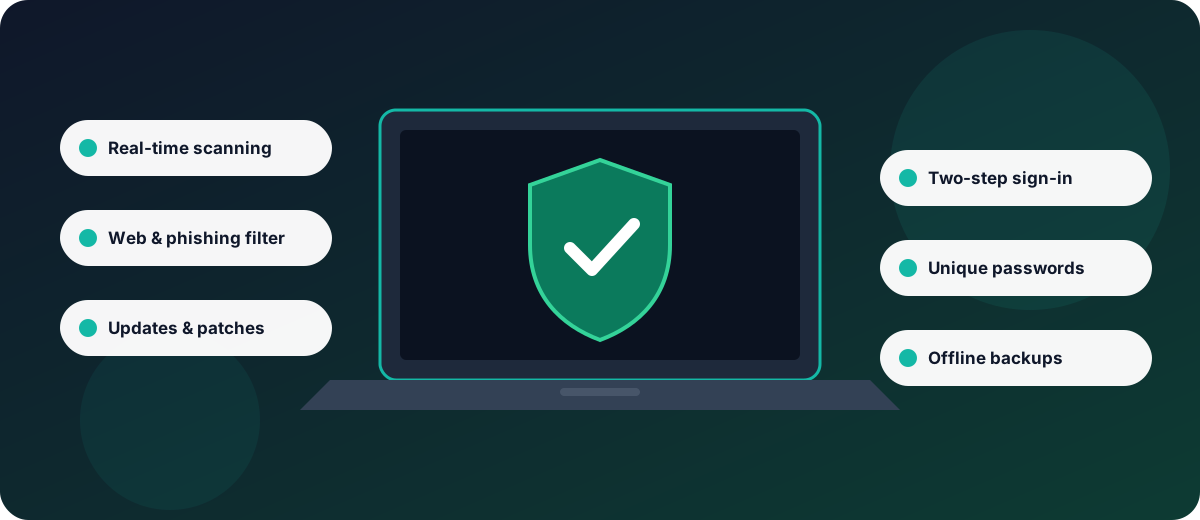
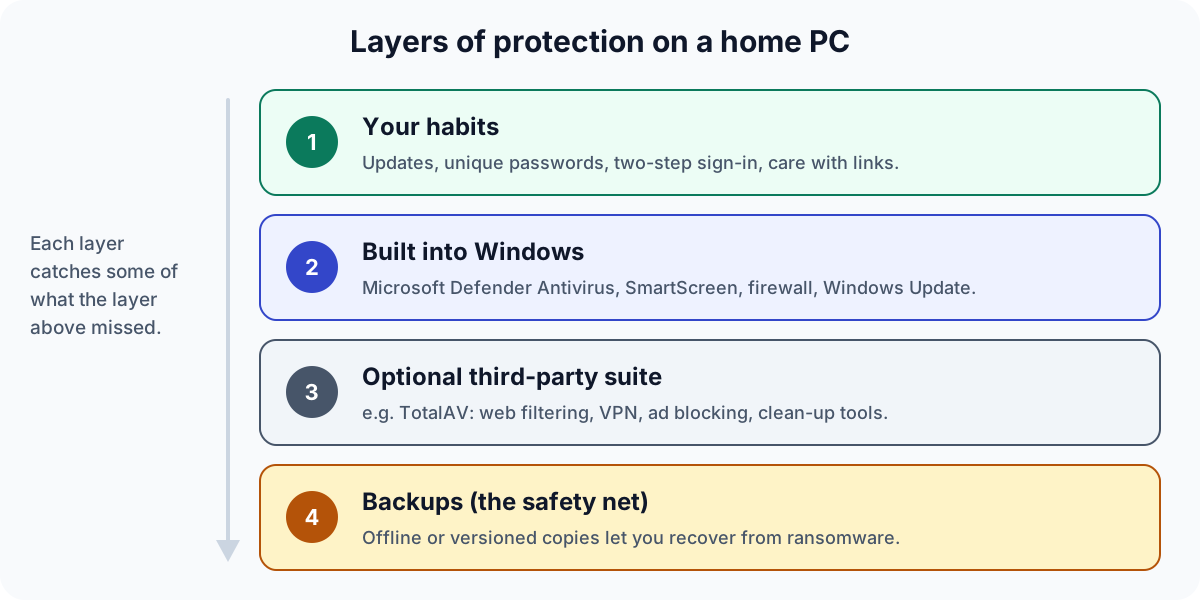
- Windows 10 and 11 already include a capable antivirus – Microsoft Defender Antivirus – plus SmartScreen web filtering and a firewall, at no extra cost. With good habits and backups, that is enough for many people.
- TotalAV is a paid security suite for Windows, macOS, Android and iOS. Besides antivirus it offers a browser web filter (WebShield), clean-up tools and, depending on the plan, a VPN, an ad blocker and a password manager.
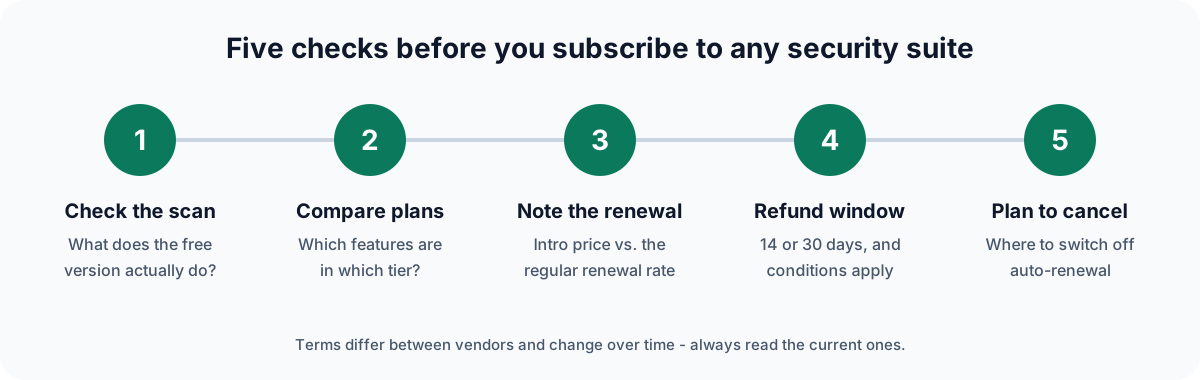
- Subscriptions renew automatically at the regular rate unless you cancel. TotalAV’s own FAQ (checked 6 October 2026) gives a 30-day money-back window for annual and biannual plans and 14 days for monthly and quarterly plans, subject to conditions.
- Check current independent lab results (AV-TEST, AV-Comparatives and others) before buying any antivirus product, including this one.
Why a home PC still needs protection
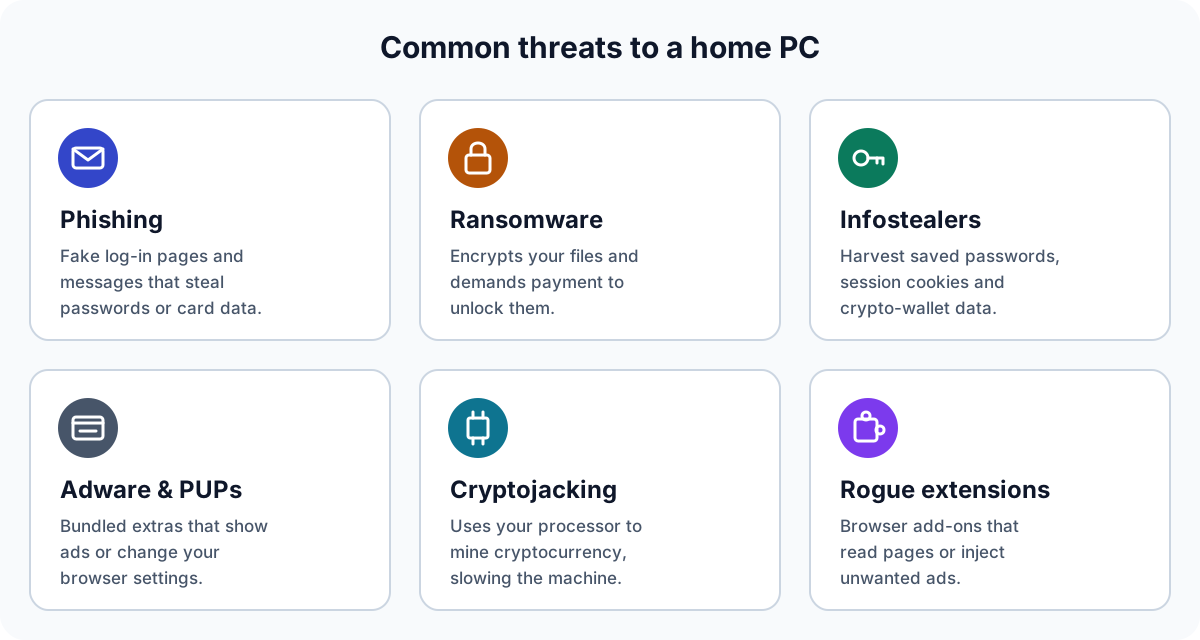
Most attacks on home users are not cinematic hacks. They are ordinary scams at scale: an e-mail that imitates your bank, a fake software update, a “free” program that installs something extra, or a browser extension that quietly reads the pages you visit. The European Union Agency for Cybersecurity (ENISA) lists ransomware, malware, social engineering such as phishing, and threats against data among the main threats in its yearly threat-landscape reports.
The aim of criminals has also shifted. Rather than wrecking your computer, modern malware usually tries to stay unnoticed while it steals something valuable – saved passwords, browser session cookies that keep you logged in, card details or cryptocurrency – or to hold your files hostage. That is why a PC that “seems fine” is not proof that it is clean, and why protection has to cover the browser and your accounts, not only files on disk.
A word on “slow PC” scares
A slow computer is far more often caused by a nearly full drive, too little memory, too many programs starting with Windows, an ageing hard disk or pending updates than by malware. Malware can slow a machine down – cryptojacking in particular – but be wary of any product or advert that treats every slowdown as an infection. We come back to this in the section on clean-up tools.
What Windows already does for you
An earlier version of this page claimed that Windows only provides basic, signature-based protection. That was wrong, and we have corrected it. According to Microsoft’s documentation, a current Windows installation includes:
- Microsoft Defender Antivirus – real-time, always-on scanning that combines signature updates with behaviour monitoring, heuristics and cloud-delivered protection.
- Microsoft Defender SmartScreen – warns about reported phishing and malware sites and about unrecognised downloads, in Microsoft Edge and in Windows itself.
- Windows Firewall and Windows Update, which closes the security holes that a large share of attacks rely on.
- Housekeeping tools: Storage Sense can delete temporary files and empty the recycle bin automatically, and Task Manager → Startup apps lets you stop programs from launching at boot.
What Windows does not bundle are extras such as a VPN service, a cross-browser ad blocker, a password manager that works across Windows, Mac and phones, or one dashboard that covers all your devices. That is the space paid suites compete in. If you install a third-party antivirus, Windows normally switches Microsoft Defender Antivirus off automatically so that two real-time scanners do not compete.
What TotalAV is
TotalAV is a consumer security suite sold by subscription. The copyright line on its website names Total Security Limited. The information below comes from TotalAV’s own website as we read it on 6 October 2026; plans and features change, and the vendor’s current information always prevails over this summary.
| Component | What it does | Plan availability (per vendor) |
|---|---|---|
| Real-time antivirus | Scans downloads, installs and programs when they are accessed; quarantines suspicious files; scheduled scans | All paid plans |
| Zero-day cloud scanning, PUA, ransomware and phishing protection | Cloud look-ups for unknown files; detection of potentially unwanted applications; anti-ransomware; phishing protection | All paid plans |
| WebShield | Browser extension that warns about or blocks known scam, phishing and spoofed websites | Listed in the product range |
| System tune-up tools | Disk cleaner, duplicate-file finder, application uninstaller, browser history and cookie clean-up | Listed for all paid plans |
| Total Adblock | Blocks ads, pop-ups and in-page video ads | Varies by plan |
| Total VPN | Encrypts your connection, for example on public Wi-Fi | Internet Security and Total Security; sold separately with Antivirus Plus |
| Total Password | Password manager | Total Security only; sold separately otherwise |
| Data-breach monitoring | Alerts if your e-mail address appears in known public breach data | Varies by plan |
The practical appeal is convenience: one account and one app family across several devices, with the browser filter and VPN in the same subscription. Whether that convenience is worth a yearly fee to you depends on what you already use – for example, if you already have a password manager and do not need a VPN, the higher tiers add less.
Want to see the current plans and prices?
Compare TotalAV plans on the official sitePartner linkPartner link: we earn a commission if you buy through it. It costs you nothing extra.
How antivirus detection works
Every serious antivirus product – free or paid – combines several techniques, because each one alone has blind spots:
- Signatures recognise files that have already been identified as malicious. They are fast and precise but cannot catch something brand new.
- Heuristics look for code traits that are typical of malware, such as packing or self-modifying code, and can flag new variants of known families.
- Behaviour monitoring watches what a program does when it runs – for example, encrypting hundreds of documents in a few seconds – and stops it.
- Cloud reputation checks how common and how trusted a file is across the vendor’s whole user base, which helps with “zero-day” files nobody has seen before.
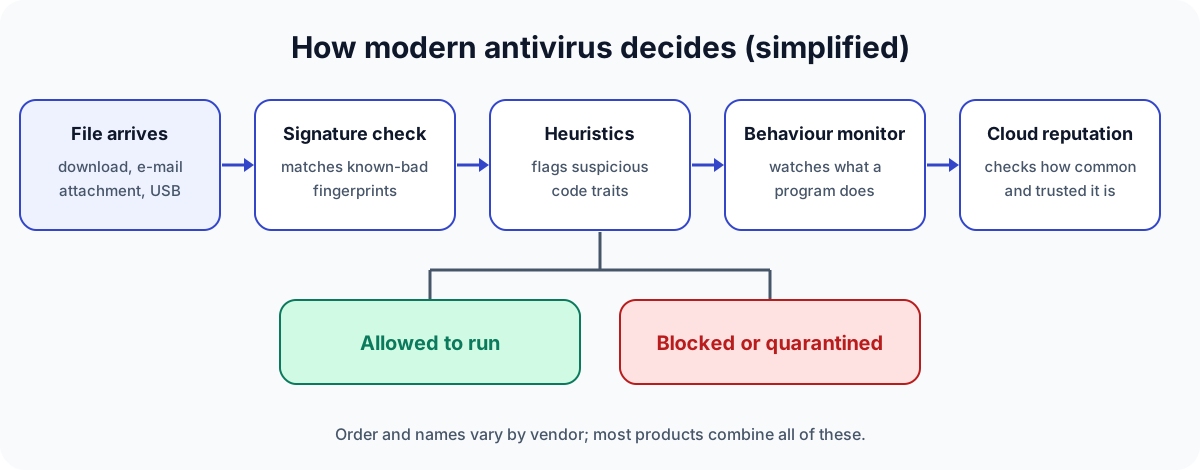
No product detects everything, and every product occasionally flags a harmless file (a “false positive”). That is why independent tests measure both protection and false alarms – see how to read them.
Clean-up and “optimisation” tools: what helps and what does not
Many security suites, TotalAV included, bundle tools that promise a faster PC. Here is an honest view of what they can and cannot do:
- Deleting junk and temporary files frees space. That matters when your drive is almost full; on a computer with plenty of free space it rarely makes a noticeable difference to speed. Windows’ Storage Sense does the same job for free.
- Managing startup programs can genuinely shorten boot time. You can do it in Task Manager, or with a suite’s more guided interface.
- Finding duplicate files and uninstalling unused apps is useful housekeeping, especially on smaller drives.
- Browser clean-up deletes history and cookies. It improves privacy on a shared computer, but it also logs you out of websites, and trackers set new cookies the next time you browse.
- Registry cleaning: an earlier version of this page said TotalAV “fixes registry errors”. TotalAV’s current website does not list such a feature, so we removed the claim. More generally, Microsoft does not support registry-cleaning utilities and warns that they can cause serious problems.
If your PC is genuinely slow, look first at free disk space, available memory, the health of the drive and whether updates are pending. A clean-up tool is a convenience, not a cure.
Free version vs paid plans
TotalAV advertises a free download. An earlier version of this page promised readers “a free scan to see exactly what needs attention”. We have softened this: the vendor’s pages we checked do not spell out clearly which functions the free edition includes and which require a paid plan. Before relying on the free version, open the app and check which features are marked as requiring an upgrade – in particular real-time protection, web protection and the removal of anything a scan finds.
Treat the result of any free scan – from any vendor – with healthy scepticism. Lists of “issues found” often include tracking cookies or temporary files, which are normal and are not infections.
Renewals, refunds and cancelling
According to TotalAV’s own subscription FAQ (checked 6 October 2026):
- Plans are offered on monthly, quarterly, biannual and annual terms and renew automatically at the then-regular rate unless you cancel before the end of the term. Introductory prices are commonly lower than the renewal price, so note both.
- The money-back guarantee covers 30 days for annual and biannual plans and 14 days for monthly, quarterly and add-on services.
- To get a refund you must first fully terminate the subscription; simply switching off auto-renewal does not end access or trigger a refund.
- Cancellation is handled in the online account portal (“My Subscriptions”).
We do not quote prices because they vary by country, currency and promotion, and change often. Check the price and the renewal price on the checkout page itself. EU consumers also have a statutory 14-day right of withdrawal for online purchases, but for digital content and services it can be lost or limited once you have expressly agreed to start using it – the European Commission’s Your Europe portal explains the rules.
How to read independent antivirus tests
Independent laboratories test antivirus products against real malware and measure three things: protection, performance impact and false alarms. The best known for home products are AV-TEST (Germany), AV-Comparatives (Austria) and SE Labs (UK); Virus Bulletin runs the VB100 certification.
- Look at the lab’s own website, not at badges on a vendor’s page. TotalAV’s website displays award badges it attributes to AV-TEST and Virus Bulletin; we have not independently verified each one, so check the current reports yourself.
- Compare against Microsoft Defender, which is tested in the same rounds. If a paid product does not clearly beat the free built-in option for your needs, the extras have to justify the price.
- Use recent results. Scores move from one test round to the next.
We do not publish our own scores or star ratings: we do not run a malware lab, and invented ratings would mislead you.
Who TotalAV may suit – and who may not need it
May suit you if…
- you want one subscription covering Windows, Mac and phones in the household;
- you would actually use the bundled VPN, ad blocker or password manager;
- you prefer a guided dashboard to Windows’ built-in settings.
You may not need it if…
- you use one Windows PC, keep it updated and are happy with Microsoft Defender;
- you already pay for a VPN or password manager you like;
- you need business features such as central management – look at business products, and check the licence terms before using any consumer plan commercially.
Decided the extras are worth it for you?
Check TotalAV’s current offerPartner linkPartner link: we earn a commission if you buy through it. It costs you nothing extra.
Habits no software can replace
Security software catches a lot, but most serious incidents are prevented – or survived – by a few habits that cost nothing:
- Install updates promptly for Windows, your browser and your apps.
- Use a unique password for every important account, ideally stored in a password manager.
- Turn on two-step verification for e-mail, banking and social media. Your e-mail account is the key to resetting all the others.
- Pause before you click. Urgency (“your account will be closed today”) is the main tool of phishing. Go to the website yourself instead of following the link.
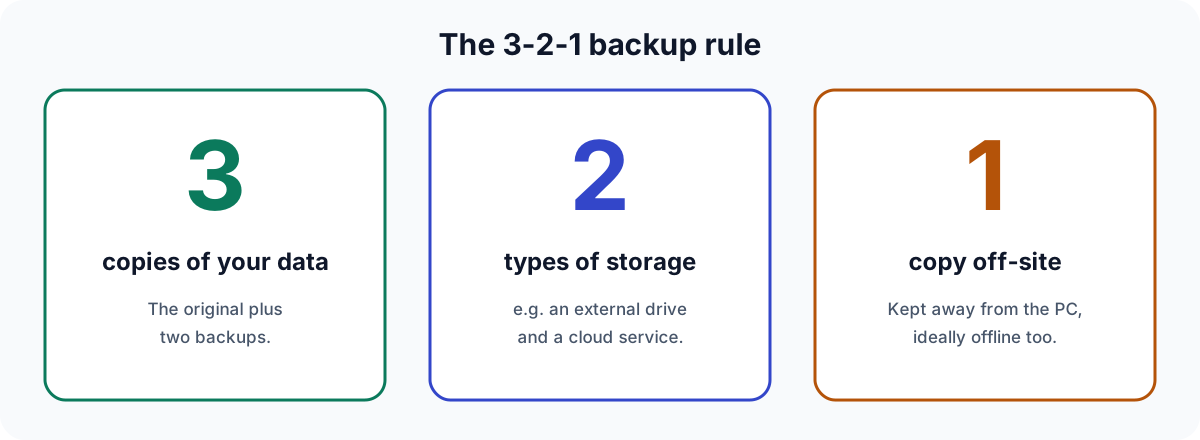
- Keep backups following the 3-2-1 rule, with at least one copy offline so ransomware cannot reach it.
Our free PC security checklist walks through each of these steps.
Frequently asked questions
Is Microsoft Defender good enough on its own?
For many home users who keep Windows updated, use a modern browser and follow the habits above, it is a solid baseline. Paid suites mainly add extras and convenience. Independent test reports let you compare the two.
Can I run TotalAV and Microsoft Defender at the same time?
You don’t need to. When a third-party antivirus registers with Windows, Microsoft Defender Antivirus normally steps aside automatically to avoid two real-time scanners competing.
Will a security suite make my computer faster?
Possibly a little, if startup programs or a nearly full disk are the bottleneck. It will not fix a lack of memory or a failing drive, and no product can guarantee a speed improvement.
Does a VPN make me anonymous?
No. A VPN encrypts the connection between your device and the VPN server, which is useful on public Wi-Fi. Websites can still recognise you through log-ins and other means, and you are trusting the VPN provider with your traffic.
How do I cancel if I change my mind?
According to TotalAV, through the “My Subscriptions” section of your online account. To get a refund within the money-back window you need to terminate the subscription fully, not only switch off auto-renewal.
Bottom line
You do not need a paid antivirus to be reasonably safe on Windows: the built-in protection, updates, unique passwords, two-step verification and backups do most of the work. TotalAV makes sense if you value one subscription across several devices, a guided interface and bundled extras such as a VPN or ad blocker – and if you go in knowing how renewal and refunds work. Check current independent test results, compare the plans, and decide on the features you will actually use.
See the plans, features and terms for yourself:
Visit the official TotalAV websitePartner linkPartner link: we earn a commission if you buy through it. It costs you nothing extra.
Sources
External links open the source’s own website. All were checked on 6 October 2026.
- Microsoft Learn – Microsoft Defender Antivirus in Windows overview
- Microsoft Support – Stay protected with Windows Security
- Microsoft Learn – Microsoft Defender SmartScreen overview
- Microsoft Support – Manage drive space with Storage Sense
- Microsoft Support – Microsoft support policy for the use of registry cleaning utilities
- ENISA – Threat Landscape
- UK National Cyber Security Centre – Top tips for staying secure online
- CISA – #StopRansomware
- AV-TEST – Test results for home Windows antivirus; AV-Comparatives – test reports; SE Labs – reports
- European Commission, Your Europe – Guarantees and returns
- TotalAV – official website (totalav.com): product, plan comparison and subscription/refund FAQ pages, read on 6 October 2026. We deliberately do not link to it outside labelled partner links.
Independence and trademarks. TotalAV is a trademark of its respective owner. teneron.online and DANBO Invest s.r.o. are not affiliated with, endorsed by or sponsored by TotalAV or its owners. We earn a commission through partner links, as disclosed at the top of this page.
Accuracy. We describe products from the vendor’s public information and the sources above. Features, prices and terms change; in case of any divergence, the information published by TotalAV itself prevails. This article is general information, not personal technical or legal advice.
Illustrations. All figures on this page are original diagrams drawn by teneron.online. They are not product screenshots and do not show the TotalAV interface.
Corrections (6 October 2026). We rewrote this article. We removed the framing as a “reader story”; corrected the claim that Windows offers only basic signature-based protection; removed the claim that TotalAV fixes registry errors; replaced the promise of a free scan showing “exactly what needs attention” with guidance on checking the free edition’s limits; and removed unverified claims about minimal performance impact and suitability for small businesses. Spotted an error? Write to info@teneron.online – see our corrections procedure.